How to Split Expenses as a Couple Living Together (Fairly)
Pick a split you both think is fair, set it once, put the rent and bills on repeat, and settle up once a month. Here is how to run it in BananaSplit without turning your relationship into accounting.
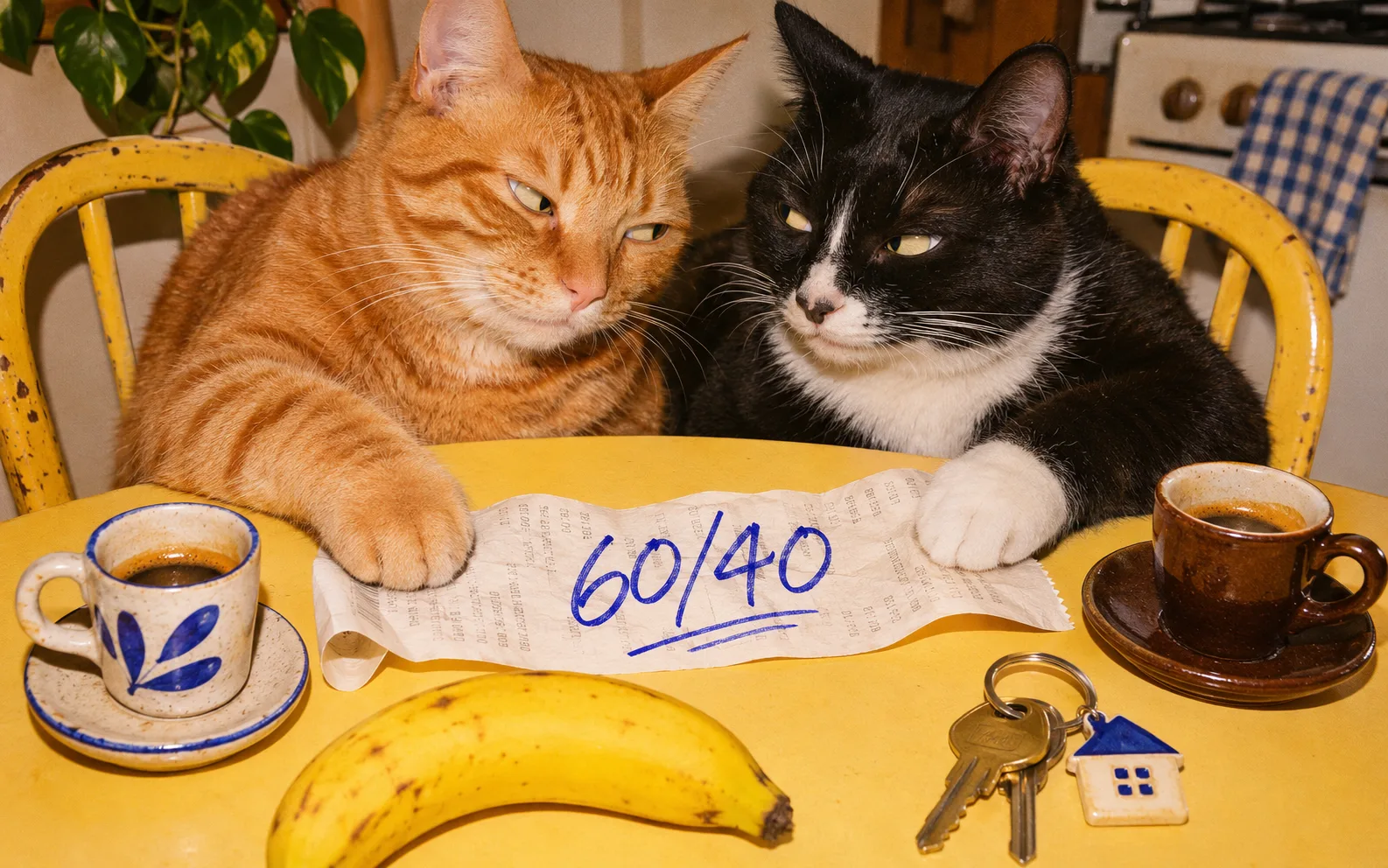
You moved in together. The rent leaves one account, the groceries another, the streaming bill sits on whoever signed up first, and the electricity bill arrives as a PDF nobody opens. Three months in, one of you asks, as casually as possible: are we actually even?
Money is one of the most common things couples argue about, and it's rarely about the amounts. It's about nobody being sure what's fair, or who paid what. This guide fixes both. First how to pick a split you both agree on, then exactly how to run it in BananaSplit, from the first group to one settle up a month.
The short answer
To split expenses as a couple living together, agree on what's shared and how you split it (50/50 or in proportion to income), log shared costs in one place, set the rent and fixed bills to repeat, and settle up once a month. An app keeps the running balance, so neither of you has to keep score.
- Choose your split: 50/50, by income or by category.
- Agree on what counts as shared.
- Create a couple group and invite your partner.
- Set your default split once.
- Put rent and fixed bills on repeat.
- Log the everyday stuff as it happens.
- Check in and settle up once a month.
Step 1: Choose how you'll split
There's no single right answer. The fairest split is the one you both say yes to, out loud, before the first bill. These are the three most couples pick from.
50/50
Every shared cost split down the middle. It's simple, easy to explain and fair when you earn roughly the same. It gets uncomfortable when one of you earns a lot more, because the same rent takes a much bigger bite out of one salary.
Based on income
Each of you pays the same share of what you earn. If one of you takes home €3,000 a month and the other €2,000, together you make €5,000, so the split is 60/40. On €1,200 rent, that's €720 and €480. Each of you is left with the same proportion of your income after the bills, which is why many couples see this as the fairest option.
By category
One of you pays the rent, the other pays groceries and bills. It feels effortless, until prices change and the two categories drift apart. If you go this way, track it anyway, so you can see when it stops being even.
Using a joint account? That works too. You still need to track what each of you paid in, and the costs that end up on personal cards anyway: the pharmacy run, the online order, the dinner one of you covered.
Step 2: Agree on what counts as shared
Ten minutes on this saves months of quiet resentment.
- Usually shared: rent or mortgage, electricity, water, gas, internet, groceries, cleaning supplies, furniture for the home, the pet.
- Usually personal: clothes, the gym, hobbies, your own phone bill, gifts for each other.
- Decide together: takeaway, date nights, holidays, the car, and the plant one of you keeps buying.
Some couples alternate date nights instead of splitting them. Others log everything. Both work. What matters is that you both picked it.
Step 3: Create a couple group and invite your partner
In BananaSplit, create a new group, choose Couple as the kind of group, and give it a name you'll recognize, like "Home" or your street name.
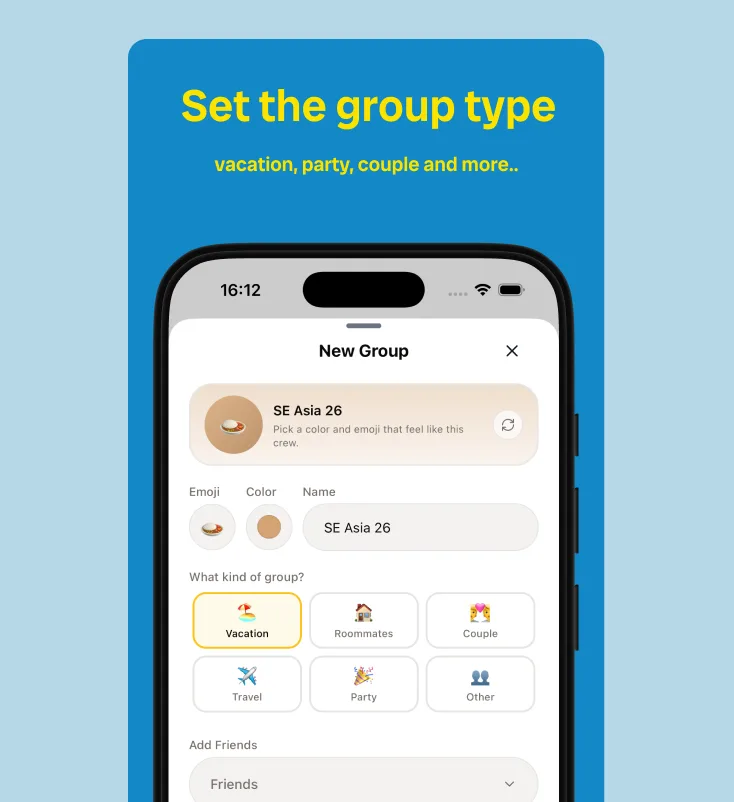
Then invite your partner. Open the group settings, tap Share group and send the link or QR code. Partner not on BananaSplit yet? Add them as a guest and start splitting today. When they join, the whole history moves to their account.
Keep one group for home. Trips and nights out with friends get their own groups, so the household balance stays about the household.
Step 4: Set your default split once
This is the step that ends the "did we do 60/40 on that one?" question. In the group settings, open Default Split and set your percentages, like 60 and 40. Every new expense in the group starts with that split, and you can still change it on any expense that's different.
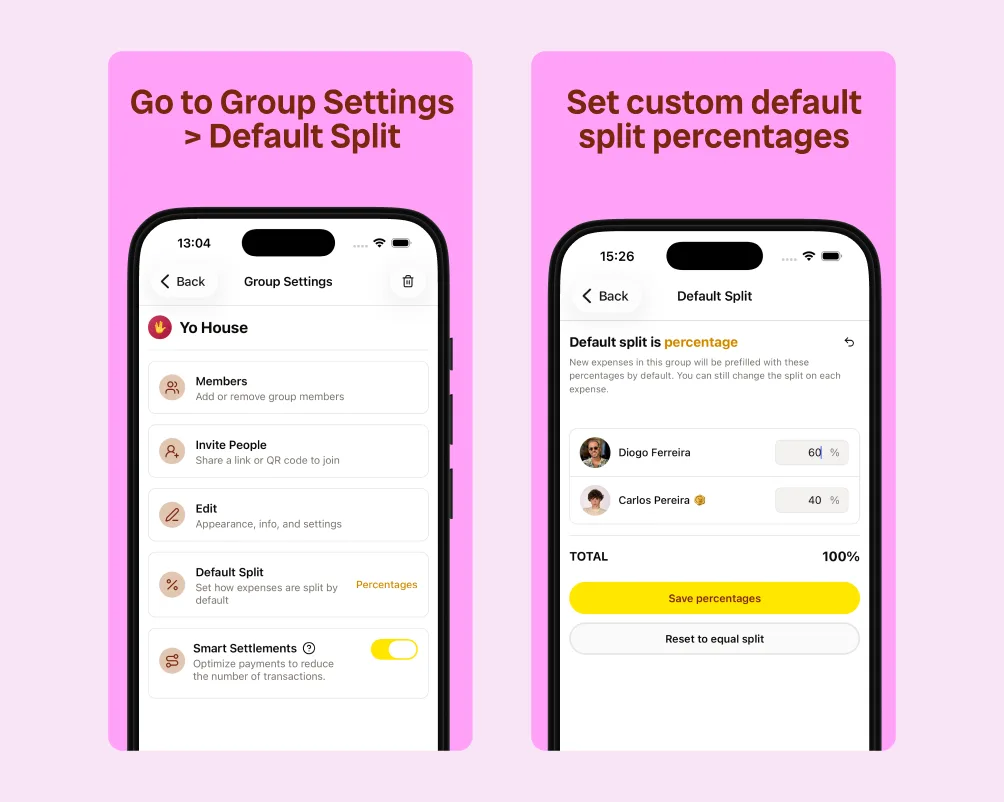
Set it once. Every new expense starts at 60/40.
If your incomes change, update the default. Expenses you already added keep the split they were added with, so last year's numbers stay right.
Step 5: Put rent and fixed bills on repeat
The rent, the internet and the streaming plans are the same every month, so stop adding them by hand. Make them recurring expenses: weekly, monthly or yearly. They show up in the group on their own, already split.
- Fixed amount? Make it recurring: rent, internet, streaming, the cleaner.
- Changes every month? Add it when the bill lands. Electricity and water bills often arrive as PDFs, and Snap It reads text PDFs, so the amount fills itself in.
- Straight from your email. Share the bill's PDF to BananaSplit from your mail app and pick your home group. It's scanned in the background and split with your default split.
- Paid once a year? A yearly recurring expense covers home insurance and that subscription you both forget about until it renews.
The Free plan includes up to 3 recurring expenses, enough for rent, internet and one more. Banana Gold makes them unlimited.
Step 6: Log the everyday stuff as it happens
Groceries, the hardware store, a lamp, the takeaway on a Sunday. Whoever pays adds it, ideally before the receipt hits the bin.
- Snap the receipt. Snap It reads the receipt and fills in the amount and description for you.
- Split a mixed shop per item. One supermarket run, your shampoo and their protein bars in the same bag as the shared groceries? Snap It lets you assign people per item, so personal things stay personal.
- Catch up from your bank once a week. Screenshot your bank app or open a statement PDF, and Snap It turns it into several expenses at once. Keep the shared ones, skip the rest.
- Quick add from the Home Screen. On iPhone, the BananaSplit widget's quick add button takes you straight to a new expense.
- Paid for something that's all theirs? Bought their train ticket? Split it by exact amounts with yours at zero, and they owe the full amount.
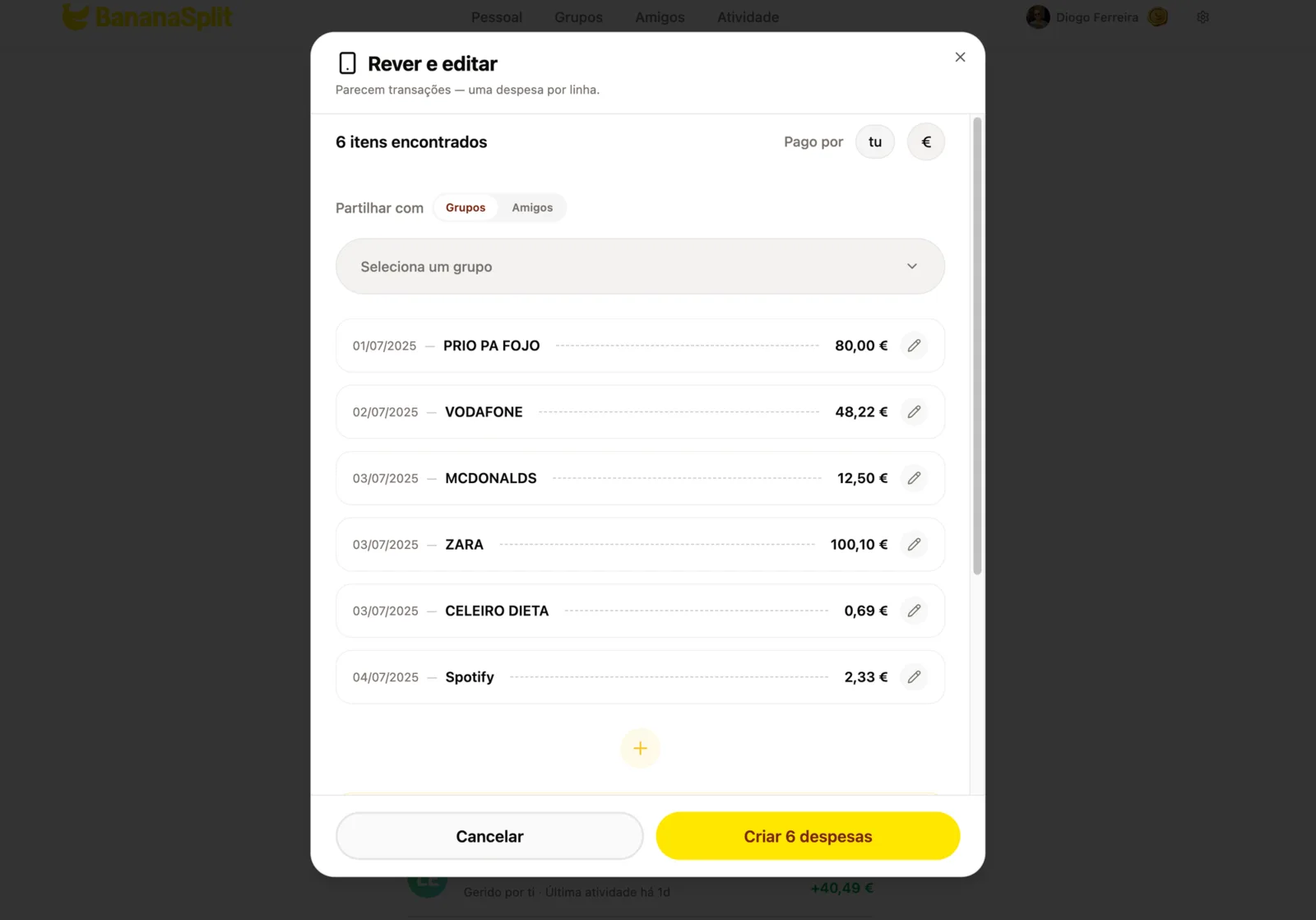
One statement, six expenses. Keep the shared ones, skip the rest.
Step 7: Check in and settle up once a month
Pick a day, like the first Sunday of the month, and make it a ten-minute money date. Coffee optional.
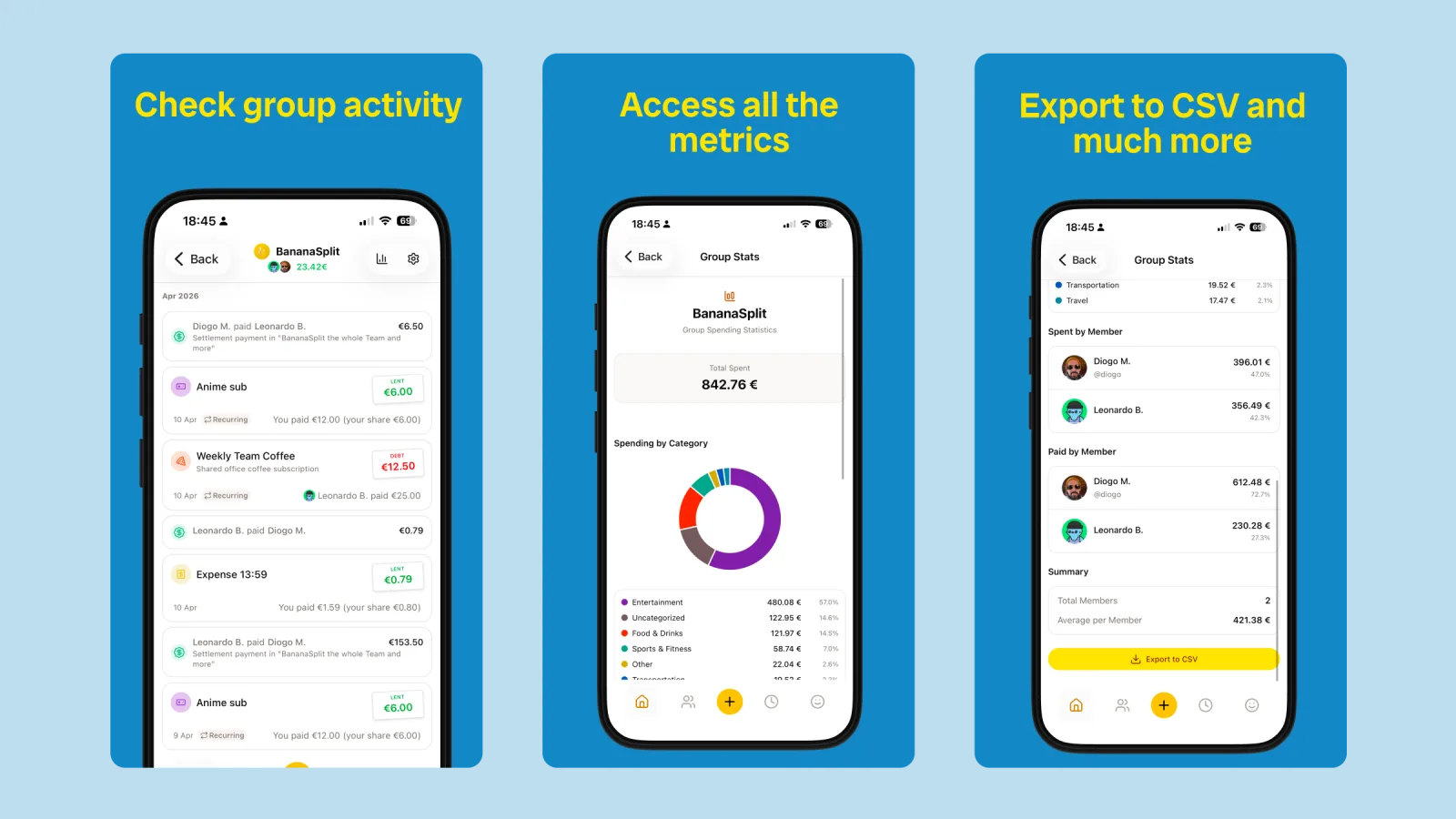
Open the group stats. You see the month's total, spending by category, and what each of you paid and spent. It's the fastest way to spot that takeaway quietly overtook groceries. Need the numbers somewhere else? Export them to CSV.
Then settle up. One transfer a month beats thirty small ones.
- Tap Settle up and choose your partner.
- Tap the suggested balance to fill in the amount.
- Send the money however you like, then confirm the payment in BananaSplit.
BananaSplit records the payment, and the balance goes back to zero. The money moves the way you already pay each other, by bank transfer, MB Way, Bizum or Revolut. If the balance has been sitting a while, a payment reminder from the app is a lot gentler than bringing it up at dinner.
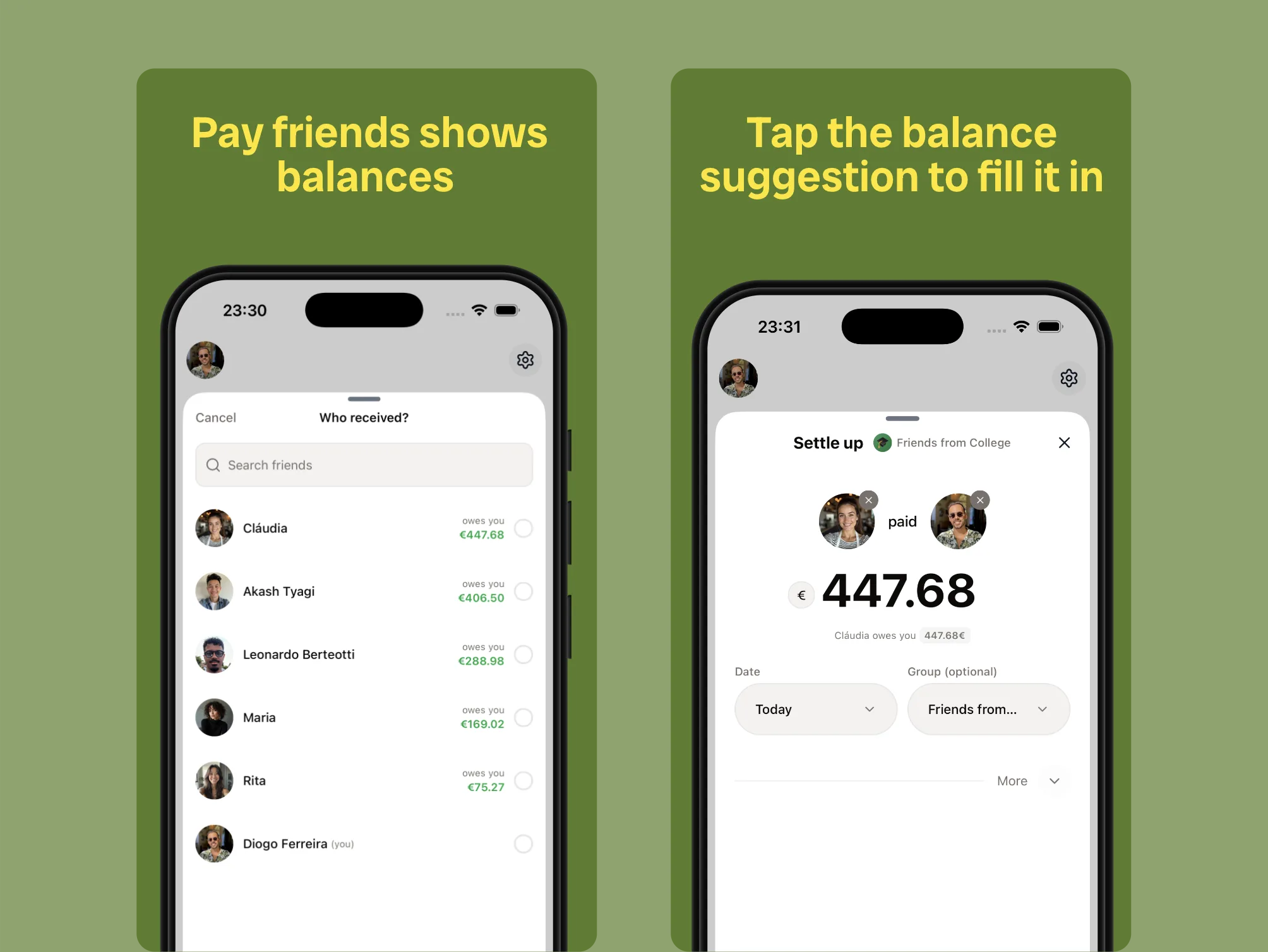
Pick your partner, tap the suggestion, done.
More tips for couples sharing expenses
- Don't log everything. Coffee for each other, small gifts, the flowers: let some things just be nice. Agree on a rough line, like anything under €10, and leave it there.
- Every change is on the record. BananaSplit logs each edit with the exact before and after, so nobody has to wonder who changed the electricity bill.
- Kids or pets in the mix? Their costs usually follow your default split. Add them to the same group so the household picture stays complete.
- Moving in with friends too? Use a separate group for the flat, and keep your couple split for the things only the two of you share. Our roommate expense tracker page has more on shared flats.
- Coming from Splitwise? Import your history and keep going without starting over.
- Prefer to just ask? Connect BananaSplit to Claude or ChatGPT and add expenses or check your balance by chat.
FAQ
What is the fairest way for couples to split expenses?
The one you both agree on. For couples with similar incomes that's usually 50/50. When incomes differ a lot, splitting in proportion to income, like 60/40, leaves each of you the same share of your pay after the bills.
Should couples split bills 50/50?
It works well when you earn about the same and spend in similar ways. If one of you earns much more, 50/50 can quietly squeeze the other, and a proportional split is often fairer.
How do you split rent with your partner based on income?
When one of you earns more, add up both take-home incomes and work out each person's share. €3,000 and €2,000 is 60/40, so €1,200 rent becomes €720 and €480. In BananaSplit, set 60/40 as the group's default split and make the rent a monthly recurring expense.
Should couples have a joint account?
It's a personal choice. A joint account is handy for the bills, but you'll still pay shared things from personal cards. A shared expense app keeps the balance right either way.
How often should couples settle up?
Once a month is the sweet spot for most couples: often enough that nothing piles up, rare enough that it doesn't feel like a transaction every day.
Is there a free app for couples to split expenses?
Yes. BananaSplit's Free plan covers groups, unlimited expenses, default splits, balances and payments, plus up to 3 recurring expenses and 3 AI scans a month. It runs on iPhone, Android and the web. Banana Gold unlocks unlimited recurring expenses and 100 scans a month.
Share a home, split the bills
Love is shared. Bills can be split. Pick your split, set it once, let the rent repeat itself and settle up once a month. Download BananaSplit and set up your home group tonight, or see more on the couples expense tracker page.